kurio.

From 40,000 frames to your next post.

Kurio reads every photo you've finished, learns what each of your Instagram feeds looks like, and brings back the ones that belong next. On your own computer.

For Windows 10 and 11 · one-time license · not on sale yet. We only use your email to tell you when it opens.

Bursts fold into stacks.

Kurio reads every drive and folder you point it at, once. Near-identical frames from the same moment collapse into one stack, so you judge each moment once.

Every frame scored against your feed.

It learns each account from your live posts, and from the ones you archived. Photos you already posted drop out for good; the rest line up by how well they fit.

You judge in one key. It learns.

Yes, re-edit, love it but can't post, not my style. Each verdict stamps the print where it sits and sharpens the next ranking.

Your next post, already in your grid.

Feed plan shows your picks in the grid as Instagram will, with notes on how each one's tone sits beside its neighbours.

See the price
Demo mode: generated photos, real scores

What happens at each step.

It reads every photo you've finished, once.

Pick whole drives or folders. Kurio makes a thumbnail and a fingerprint of each photo, and from then on only reads what's new. Near-identical frames collapse into one stack. Photos you already posted never come back as suggestions.

Your drives are only ever read. Move or rename your photos and every score and vote follows them.

It scores every frame against what you posted, and what you took down.

Point Kurio at the data export Instagram gives you. Your live posts teach it what fits each account. Your archived posts teach it what doesn't, and you can say how much: a close call, wrong for the flow, or just bad.

It finds the export in your Downloads, spots the wrong format, and unpacks it in one click.

Every score shows its working.

A score reads like a darkroom test strip: one length on a fixed scale, built from how well the photo fits your live feed, what your votes say and the tone you prefer, minus how much it looks like something you archived.

The checks it learns, like taste or scan quality, show how often they're right on votes they haven't seen, and gain pull only as they prove it. A new copy starts with no opinions at all.

You judge in one key. It learns from every verdict.

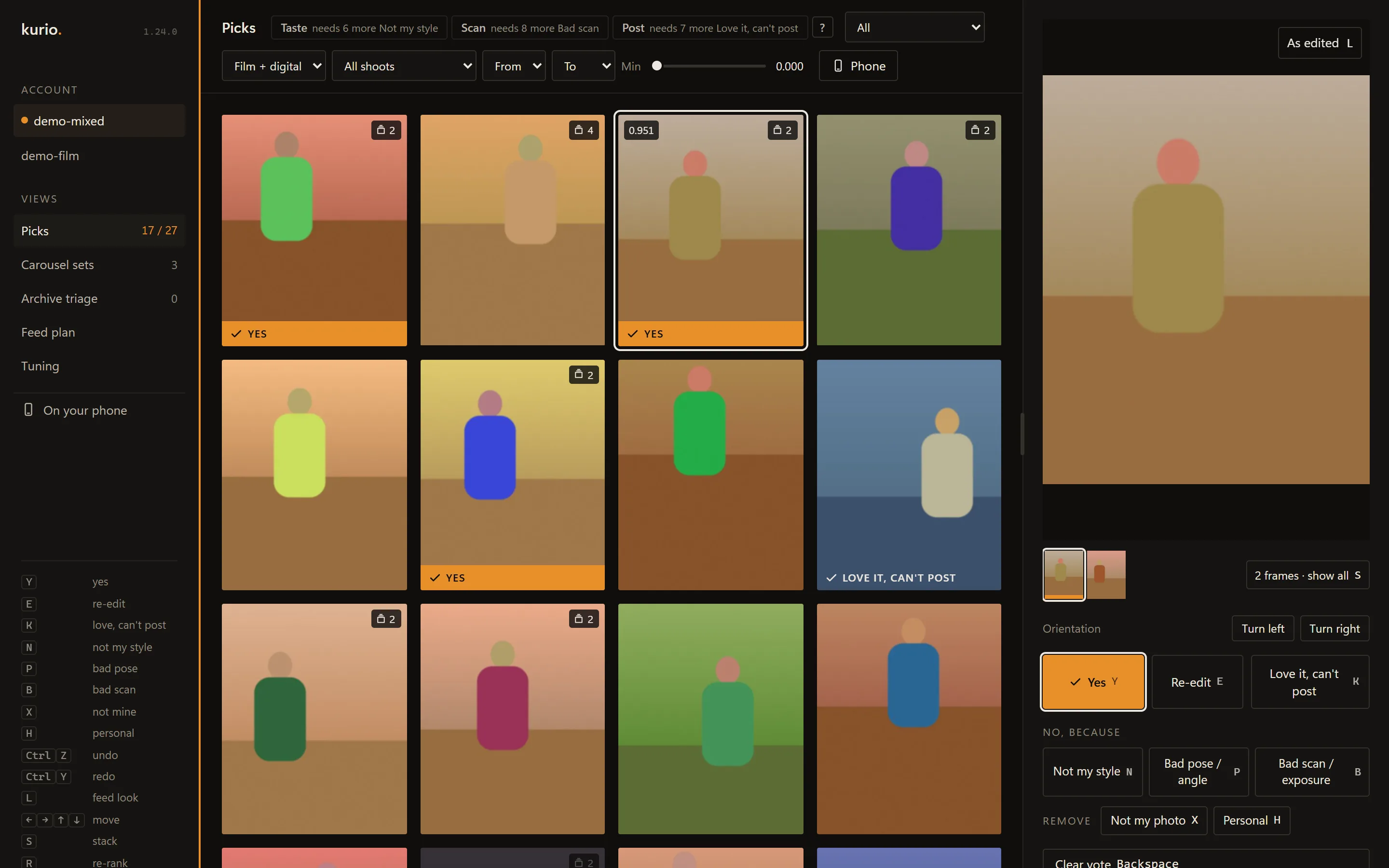
Picks shows the best frames for the account you choose. Say yes, or say why not: re-edit, love it but can't post, not my style, bad pose, bad scan. A verdict stamps the print where it sits; nothing jumps. Press R and the ranking takes your verdicts in.

  • Y yes
  • E re-edit
  • K love it, can't post
  • N not my style
  • P bad pose
  • B bad scan

Then it helps you post.

Carousel sets

Two to twenty frames from one shoot that sit together in colour and tone, without repeating a frame. Reorder them, leave one out, accept the set: every frame becomes a Yes, kept together as one carousel.

Feed plan

Your grid as Instagram shows it, with your picks queued on top (outlined here). Drop one in and read how its tone sits next to its neighbours, or ask for Suggest next, Find a bridge or More like this. Mark it Posted when it's up.

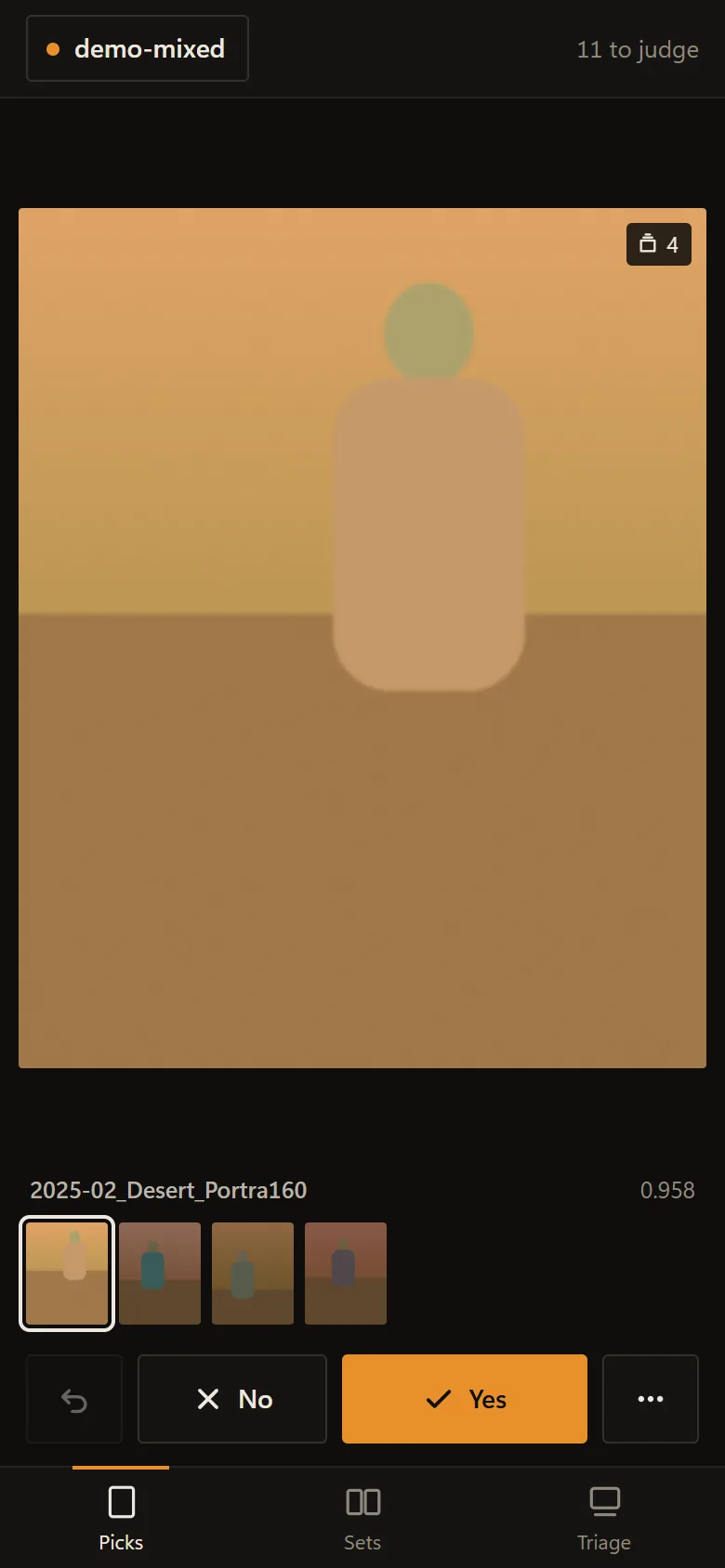
Kurio's phone page in demo mode: one large demo photo with its stack count, its score, the other frames of its stack, and No and Yes buttons above the Picks, Sets and Triage tabs.

On your phone

Scan a code, then judge picks from the sofa: swipe right for yes, left for not my style. The phone pages come from your own Kurio, on your wifi or from anywhere through Tailscale. Nothing in between.

Kurio's Picks view in demo mode: a wall of generated photos, some stamped Yes or Love it, can't post, with the selected frame enlarged on the right above its vote buttons.
Kurio on Windows, in demo mode. The photos are generated; yours would be here.

Nothing leaves your computer.

Kurio is a desktop app, not a website. Your photos, your Instagram data and everything it learns stay on your computer. It never uploads a thing.

Your photo drives
Only read. Never written, moved, renamed or deleted.
The image model
Runs on your own graphics card, or on the processor if there isn't one.
The network
Used for two things: one 1.7 GB model download during setup, and checking for updates.
Your data
One folder on your computer. Uninstalling Kurio keeps it.

Set up in one sitting.

  1. 1

    Install

    One installer, no admin prompt. It brings its own Python and picks the right engine for your computer.

  2. 2

    Get started

    Eight steps that check themselves, most of them one click: the model, your Instagram export, your accounts, your folders.

  3. 3

    First scan

    Kurio reads your archive once and shows how far it's got. A big archive takes hours; after that, only new photos.

Computer
Windows 10 or 11. Mac later.
Space
About 5 GB for the model, thumbnails and index.
Graphics card
Optional. An NVIDIA card makes the first scan faster.
Instagram
Your data export, for each account.

One license. Yours to keep.

Planned price$49$39 at launch

  • Paid once, no subscription
  • A year of updates

Not on sale yet. Also planned: a 5-day free trial before you buy. Your email is only used to tell you when Kurio opens.

On the way

Videos. Reels and clips beside your photos, scored from a few frames each.

Mac. After the Windows launch.

A phone app in the stores, as the desktop app's companion.